
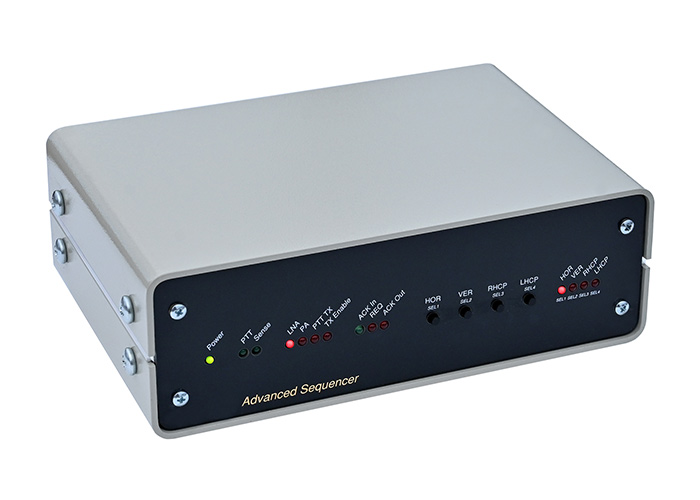
Advanced Sequencer for Use On HF-VHF-UHF
The Advanced Sequencer is a device that will handle switching of LNA, Transceiver, PA, and relays in use in HF/V/U/SHF amateur radio stations. It will provide the correct sequential time-delayed outputs to various devices to prevent “hot switching”. In that way, there won’t be arcing of relay contacts during the transition period, damaging the relays or causing other components to become damaged or destroyed.
And most importantly. A properly configured Advanced Sequencer will prevent the preamplifier from burning out in normal operations, competitions, or EME work.
Seamless connection with our EME2 and EME3 lines of antenna preamplifiers and switches.
Advanced Sequencer Appearance:

Key Features:
- Four sequencer outputs, each controlled by a fast relay.
- Seamless connection with our EME2 and EME3 lines of antenna preamplifiers and switches.
- Visual indication of each output state using LEDs.
- Four push buttons to select four different antennas, four different polarizations, toggle switches, or a mix of those
- Conditional switching of Transmit and Receive Antennas
- Multiband systems protection – Possibility of using multiple sequencers
- Automatic Master/Slave sequencer configuration
- Implemented Intelligent Conditional Sequencing – SENSE Input – Fail Safe Relay option
- Automatic Measuring of Unknown Relay Speed – Measure function
- Three programmable sequence timers from 1ms to 1000ms in 1ms steps
- All parameters and settings of the Advanced Sequencer can be configured using our free Windows PC program “Advanced Sequencer PC Tool”.
- Fully programmable via USB-C interface.
- The possibility of updating the software via the Internet using a USB-C connector when new versions are released
- Outputs can switch AC or DC loads of up to 30V and current up to 1A.
- Dimensions, W x H x D, (180 x 60 x 110 mm)
- Power requirements: 12 -13.6V VDC, 150mA
Advanced Sequencer Front View Receiving Position:

The heart of Advanced Sequencer is a 32-bit Arm® Cortex®-M0+ Microcontroller which brings a lot of features and flexibility.
The device can be easily reconfigured as the radio setup changes.
Key Features Explanations:
- Four sequencer outputs, each controlled by a fast relay.
The sequencer controls up to four outputs. They can be used as either normally open or normally closed. The outputs can switch AC or DC loads of up to 30V and current up to 1A. Integrated super fast 2ms relays.
Advanced Sequencer Rear Connectors View:

Seamless connection with our EME2 and EME3 lines of antenna preamplifiers and switches.
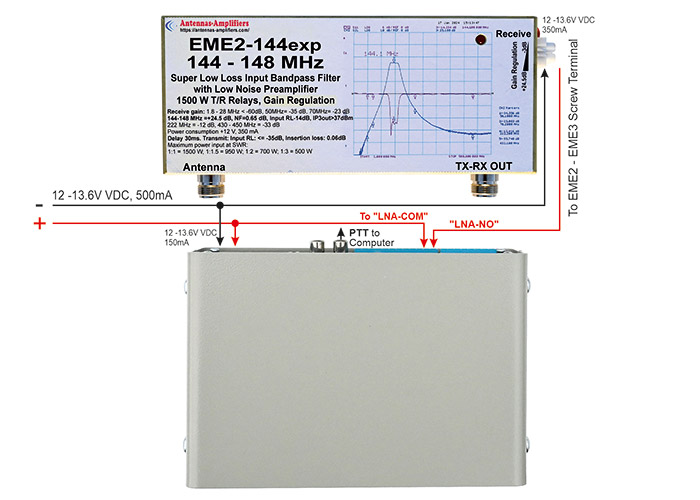
Advanced Sequencer Front View Transmit Position
- Visual indication of each output state using LEDs.

Four push buttons to select four different antennas, four different polarizations, toggle switches, or a mix of those
A sequencer is the only place where transmitting path relays must be controlled, otherwise hot switching may occur, leading to the inevitable burning of coaxial relays or preamplifiers.
In the transmitting path, there could be not just TX/RX relays but also:
“Polarization relays” for CROSS or XPOL polarization switches.
Antenna selection relays in HF contests, such as “East” and “West” antennas (up to four antennas).
Antenna selection in antenna stacks. The choice between “Upper,” “Lower,” or “Both”.
Free choice antenna selection on HF between transmitting and receiving antennas. Like 1+3, 2+2 or 3+1
Toggle switches. Some or all switches could be used as ON/OFF switches.
Connecting Advanced Sequencer With CROSS Polarization Switch H-V-RHCP

Four push buttons are used to select different polarization settings in the receive and transmit
“HOR” – By default, no power is required. Polarization Switch is already on horizontal polarization)
“VER” – Selecting “VER” Advanced Sequencer will select Vertical polarization on CROSS Switch.
“RHCP” Selecting “RHCP” Advanced Sequencer will select RHCP polarization on CROSS Switch mainly for LEO.
“LHCP” doesn’t have to be used. Or could be used as a Toggle switch to switch the ON or OFF camera.
Connecting Advanced Sequencer With XPOL Polarization Switch H-V-RHCP-LHCP

Four push buttons are used to select different polarization settings in the receive and transmit
“HOR” – Selecting “HOR” Advanced Sequencer will select Horizontal polarization on XPOL Switch.
“VER” – Selecting “VER” Advanced Sequencer will select Vertical polarization on XPOL Switch.
“RHCP” – By default, no power is required. Polarization Switch is already on RHCP.
“LHCP” Selecting “LHCP” Advanced Sequencer will select LHCP polarization on XPOL Switch.
Connecting Advanced Sequencer With HF Antennas (example)

Conditional switching of Transmit and Receive Antennas
- To change the receive antenna, press one of the four “SEL” buttons shortly. If the sequencer is currently in receive mode the change will happen immediately.
- If the sequencer is in transmit mode, the LED that corresponds to the new receive antenna will start to blink and the antenna change will happen when the sequencer is changed back on receive.
- To change the transmit antenna, press one of the four “SEL” buttons for TWO seconds and the LED that corresponds to the new chosen transmit antenna will start to blink. The antenna change will happen the first time when the sequencer changes from receive to transmit.
- In short Advanced Sequencer will take care when you can change transmit and receive antennas to prevent accidental switching of antennas in the middle of transmit periods and prevent burning of relays or preamplifiers.
- When tired in the middle of the contest, the sequencer will prevent choosing a receiving antenna for transmitting, and so on.
Multiband systems protection – Possibility of using multiple sequencers

What if you have two or three active bands? What if you want to transmit on the 2m while a 70cm system is in close proximity? It’s highly likely that you could damage the preamplifier of the neighboring band if you operate at high power.
In such cases, it would be useful for all bands to enter transmit mode simultaneously.
However, only the band that initiates the transmission would emit RF, while the other bands would simply switch their preamplifiers to the transmit position to protect themselves.
This scenario assumes that Advanced Sequencers are utilized across all bands.
Automatic Master/Slave sequencer configuration
Whenever Advanced Sequencer sees its own PTT signal, it immediately becomes a “Master”.
He sends a directive to the other “Slave” sequencers to switch to transmit mode.
Upon receiving confirmation that all sequencers are set to transmit, the Master sequencer continues with his transmit sequence.
At a later time, the other Advanced Sequencer may receive the PTT and will become the Master. All other sequencers will become “Slave” sequencers and follow the above procedure.
Up to five sequencers can be connected in parallel to work together.
Intelligent Conditional Sequencing – SENSE Input – Fail Safe Relay option
Advanced Sequencer Rear Connectors View
When the option is enabled, the sequencer will wait indefinitely before proceeding until it receives feedback that the transmit relays are activated.
Many coaxial relays come with auxiliary contacts that indicate when the transmit position is engaged, before applying RF.
Our “EME” line of preamplifiers has an optional “failsafe” output, which provides feedback to the sequencer regarding whether they are in the transmit position.
Connecting and configuring the “SENSE” signal can add an extra layer of security to the system.
How does Intelligent Conditional Sequencing work?
What if a short circuit occurs in the auxiliary contacts that indicate “everything is OK” allowing us to continue the transmission procedure, even though we later realize it was incorrect information that damaged the preamplifier?
If the SENSE is enabled, the Advanced Sequencer will not continue the transmission sequence until it detects a change in the input state.
If the “SENSE” input state does not change, it indicates a potential issue with the system that may require repair.
But if there is a change (from High to Low or Low to High), the Advanced Sequencer will continue the transmit procedure.
The SENSE input can be set to high or low as an active state.
Automatic Measuring of Unknown Relay Speed – Measure function

- Connect the COM and NO contacts of the unknown relay to the “SENSE” input.
- Connect the TXPTT-COM and TXPTT-NO output of the Advanced Sequencer to control the coil of the unknown relay, as shown in the diagram.
- Open the PCTool program and use the “Measure” function
By using this function you will know how to properly configure sequencer timers without guessing. And you will know how fast your relays are, which does not have to be identical to similar ones
Measurements can also be used for purposes that are not related to the sequencer.
Advanced Sequencer PC Tool
All parameters and settings of the Advanced Sequencer can be configured using our free Windows PC program:
Easy as it should be.
- Choose the correct COM port.
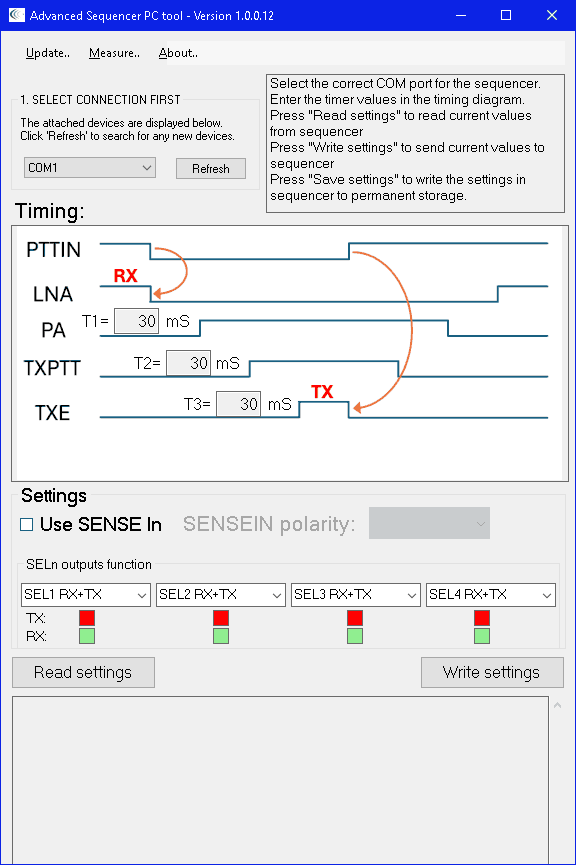
Advanced Sequencer Timers Settings
- Enter correct timers settings for any value from 1ms to 1000ms, in steps of 1ms.

Sequencer SENSE Settings
- Enable or disable the SENSE input depending on whether you have an EME preamplifier with a Fail Safe Relay option or a relay with auxiliary contacts.
- SENSE In Polarity could be as set as “Active Low”, “Active High” or disabled (default).
SENSE In Polarity Active Low

SENSE In Polarity Active High

Polarity (SEL) Buttons behavior:
- Choose all four (Hor, Ver, RHCP, RHCP) or (SEL1, SEL2, SEL3, SEL4) buttons’ behavior
- “SEL1 RX+TX” This setting will choose the antenna that can be Transmitting or Receiving
- “SEL1 RX only” This setting will choose the antenna that can be only Receiving.
- “SEL1 TX only” This setting will choose the antenna that can only Transmit.
- “SEL1 Toggle Switch” This setting button can set the output toggle switch to switch the ON or OFF of the other equipment.
- The same for all other buttons (Ver, RHCP, RHCP) (SEL2, SEL3, and SEL4)
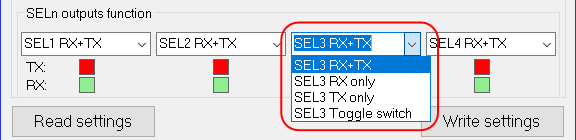
When satisfied, Write Setting” to Advanced Sequencer via USB-C port

Advanced Sequencer Rear View

When a new version is available update Advanced Sequencer via USB-C port:
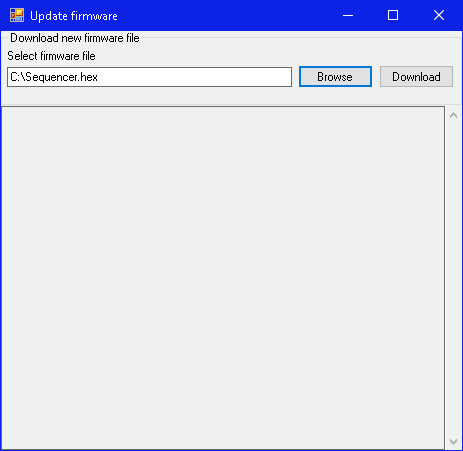
The Advanced Sequencer PC Tool Windows program can be downloaded here as setup.msi or setup.exe
Seamless connection with our EME2 and EME3 lines of antenna preamplifiers and switches.
With an external relay, the Advanced Sequencer could control any Low Noise Preamplifier
Important manuals:
Advanced-Sequencer Connection Possibilities EME2-EME3-CROSS-XPOL-Polarization-Switch-H-V-RHCP-LHCP (PDF)
Ingebrigt LB6B made an excellent manual on how to connect the Advanced Sequencer with FlexRadio and a Transverter
Tilen –
The Advanced Sequencer and EME2-144EXP are working excellently.
Tilen S52OW